The OfficeOnline Web interface
You can connect to your OfficeOnline server using any Web browser. Just point it to your OfficeOnline server URL (e.g. cloud.example.com) and enter your username and password:
Web browser requirements
For the best experience with the OfficeOnline web interface, we recommend that you use the latest and supported version of a browser from this list:
Google Chrome/Chromium (Desktop and Android)
Mozilla Firefox (Desktop and Android)
Apple Safari (Desktop and iOS)
Microsoft Edge
Note
Not all versions are supported. OfficeOnline is tested and built to work with these versions only.
Note
If you want to use OfficeOnline Talk you need to run Mozilla Firefox 52+ or Google Chrome/Chromium 49+ to have the full experience with video calls and screensharing.
Warning
Microsoft Internet Explorer is NOT supported.
Navigating the main user interface
By default, the OfficeOnline Web interface opens to your Dashboard or Files page:
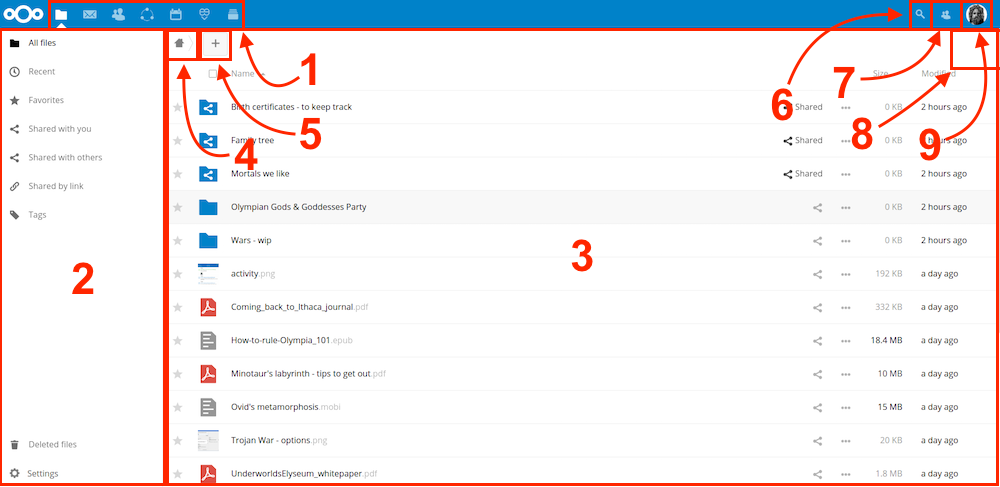
In Files you can add, remove, and share files, and the server administrator can change access privileges.
The OfficeOnline user interface contains the following fields and functions:
Apps Selection Menu (1): Located in the upper left corner, you’ll find all your apps which are available on your instance of OfficeOnline. Clicking on an app icon will redirect you to the app.
Apps Information field (2): Located in the left sidebar, this provides filters and tasks associated with your selected app. For example, when you are using the Files app you have a special set of filters for quickly finding your files, such as files that have been shared with you, and files that you have shared with others. You’ll see different items for other apps.
Application View (3): The main central field in the OfficeOnline user interface. This field displays the contents or user features of your selected app.
Navigation Bar (4): Located over the main viewing window (the Application View), this bar provides a type of breadcrumbs navigation that enables you to migrate to higher levels of the folder hierarchy up to the root level (home).
New button (5): Located in the Navigation Bar, the
Newbutton enables you to create new files, new folders, or upload files.
Note
You can also drag and drop files from your file manager into the Files Application View to upload them to your instance.
Search field (6): Click on the Magnifier in the upper right corner to search for files and entries of the current app.
Contacts Menu (7): Gives you an overview about your contacts and users on your server. Dependent on the given details and available apps, you can directly start a video call with them or send emails.
Grid view button (8): This looks like four little squares, which toggles the grid view for folders and files.
Settings menu (9): Click on your profile picture, located to the right of the Search field, to open your Settings dropdown menu. Your Settings page provides the following settings and features:
Links to download desktop and mobile apps
Server usage and space availability
Password management
Name, email, and profile picture settings
Manage connected browsers and devices
Group memberships
Interface language settings
Manage notifications
Federated Cloud ID and social media-sharing buttons
SSL/TLS certificate manager for external storages
Your Two-factor Settings
OfficeOnline Version information
See Setting your preferences section to learn more about these settings.